
IT Asset Management: Best Practices, Lifecycle & Use Cases
IT asset management (ITAM) is the process of tracking, managing, and optimizing an organization’s IT assets throughout their lifecycle, from procurement and deployment through maintenance, recovery, and disposal. A strong ITAM program gives organizations greater visibility into their hardware and software while helping control costs, reduce security risks, and support compliance.
As organizations manage more laptops, software licenses, cloud applications, and equipment across remote and distributed workforces, maintaining accurate asset records becomes increasingly important. Without a structured IT asset management process, companies can lose track of devices, continue paying for unused software, struggle to recover equipment from departing employees, and lack the information needed for audits or technology planning.
Effective IT asset management practices combine accurate inventory tracking, clear lifecycle processes, software and hardware asset management, defined ownership, and automation. This guide explains how ITAM works, its key benefits and lifecycle stages, how organizations can implement an effective IT asset management program, and how ITAM can solve common business challenges.
Why Does IT Asset Management Matter?
IT asset management matters because it gives organizations visibility and control over their technology assets throughout their lifecycle. Without that visibility, IT teams can overspend on hardware and software, lose track of devices, miss maintenance or security requirements, and struggle to make informed technology decisions.
Effective ITAM can help organizations:
Reduce costs: Tracking asset ownership and usage can help identify unused software licenses, underutilized hardware, duplicate purchases, and opportunities to redeploy existing equipment instead of buying new devices.
Improve operational efficiency: Centralized asset records and automated workflows reduce manual tracking and give IT teams better visibility into device status, location, ownership, and lifecycle stage.
Reduce security and compliance risks: ITAM helps organizations identify the hardware and software in their environment, manage software licensing, track devices during employee transitions, and ensure retired assets follow appropriate data sanitization and disposal processes.
Make better technology decisions: Reliable asset data helps organizations plan purchases, manage refresh cycles, forecast technology needs, and understand when equipment should be repaired, redeployed, replaced, or retired.
As organizations manage technology across offices, remote employees, cloud environments, and distributed teams, ITAM provides the foundation for maintaining control of those assets throughout their lifecycle.
What Types of IT Assets Should Organizations Manage?
Organizations should manage both hardware and software assets as part of an effective IT asset management program. These include the physical technology an organization owns or uses, as well as its applications, software licenses, subscriptions, and cloud services.
Hardware assets: Physical technology such as laptops, desktop computers, monitors, mobile devices, servers, networking equipment, and other company-owned devices. Hardware asset management (HAM) tracks these assets from procurement and deployment through maintenance, recovery, redeployment, and eventual retirement or disposal.
Software assets: Applications, software licenses, subscriptions, cloud services, and other digital resources used by an organization. Software asset management (SAM) helps IT teams track licensing, usage, renewals, and compliance while identifying unused or redundant software that may be creating unnecessary costs.
Data assets: Business data can also be treated as an IT asset that requires appropriate management and protection. Organizations should understand what data they maintain, where it is stored, who has access to it, how sensitive it is, and what security, retention, and compliance requirements apply.
Licenses: Software licenses define an organization's rights to install, access, and use software. Tracking license ownership, usage, renewals, and entitlements helps organizations maintain compliance, avoid unnecessary software spending, and identify licenses that can be reassigned or eliminated.
Managing hardware, software, data, and licenses together gives organizations a more complete view of their technology environment and provides the foundation for effective IT asset management throughout the lifecycle.
What Is Software Asset Management (SAM)?
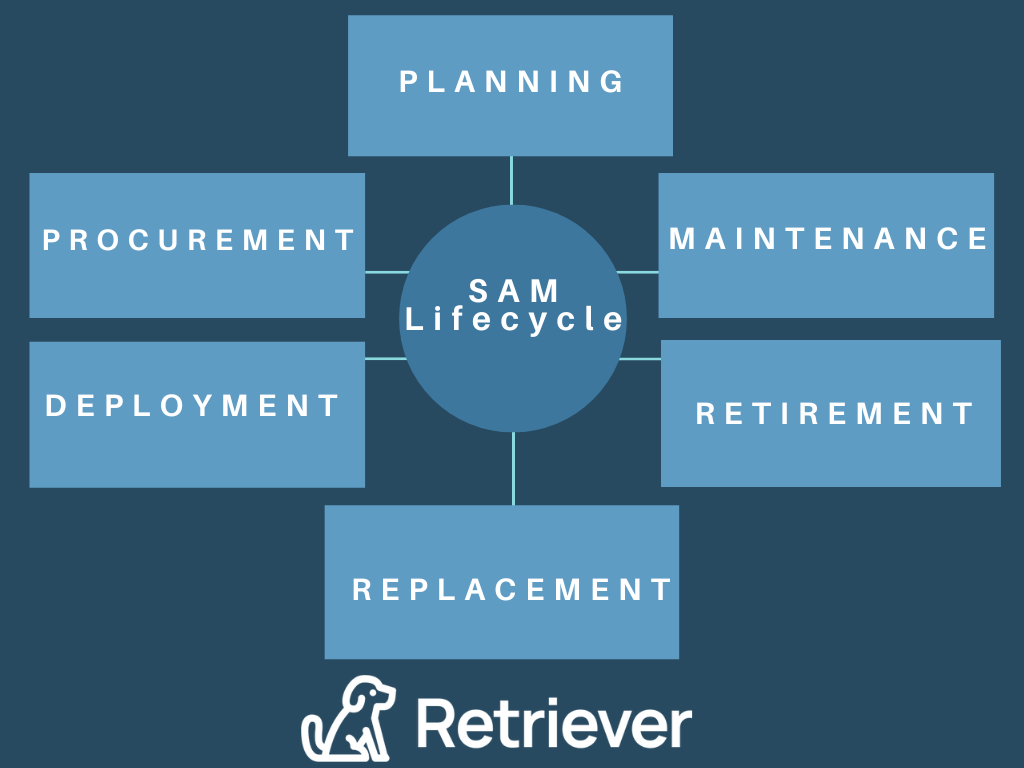
Software Asset Management (SAM) is the practice of managing an organization’s software applications, licenses, subscriptions, and usage throughout their lifecycle. SAM helps organizations understand what software they have, who is using it, whether licensing requirements are being met, and where unnecessary software spending can be reduced.
Effective SAM helps organizations control software costs, maintain licensing compliance, improve visibility into software usage, and make better decisions about the applications and subscriptions they use.
The key stages of the SAM lifecycle are:
Planning: Identify the organization's software requirements, existing applications, licensing needs, and budget before acquiring new software. This helps prevent unnecessary purchases and establishes a strategy for managing software throughout its lifecycle.
Procurement: Acquire software based on business needs and negotiate appropriate licensing agreements with vendors. Organizations should document licenses, contracts, entitlements, renewal dates, and purchasing information so these records can be tracked throughout the lifecycle.
Deployment: Install, configure, and provide access to approved software while recording which users or devices have been assigned licenses. Accurate deployment records help organizations understand where software is being used and whether available licenses are being allocated effectively.
Maintenance: Monitor software usage, renewals, updates, patches, and licensing requirements. Regular reviews can identify unused or underutilized applications, potential compliance issues, and opportunities to reduce software costs.
Retirement: Remove software that is no longer required or has reached the end of its useful life. Organizations should update asset and licensing records, remove access when appropriate, and confirm that contractual or data requirements are addressed.
Replacement: Evaluate replacement software based on current business requirements, compatibility, security, cost, and licensing terms. Organizations can then transition users to the new application while retiring the previous software in a controlled manner.
Managing each stage of the SAM lifecycle helps organizations maintain software license compliance, control costs, improve visibility into software usage, and get greater value from their software investments.
What Is Hardware Asset Management (HAM)?
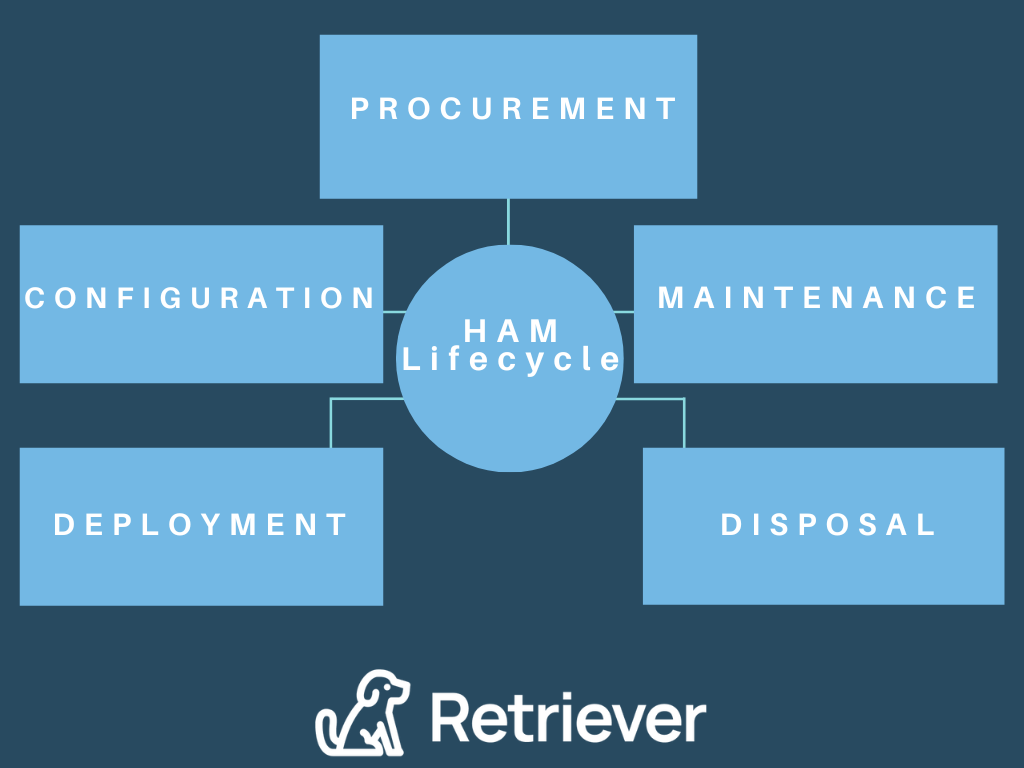
Hardware Asset Management (HAM) is the practice of tracking and managing an organization’s physical IT assets throughout their lifecycle, from procurement and deployment through maintenance, recovery, redeployment, and disposal. HAM helps organizations understand what hardware they own, where each asset is located, who is using it, and its current condition and lifecycle status.
Effective HAM gives IT teams greater visibility into assets such as laptops, desktop computers, monitors, mobile devices, servers, and networking equipment. This visibility can help organizations reduce unnecessary hardware purchases, recover equipment when employees leave, identify devices that can be redeployed, plan refresh cycles, and ensure retired equipment is handled securely.
What Are the Key Stages of the Hardware Asset Management Lifecycle?
The key stages of the hardware asset management lifecycle are:
Planning: Identify hardware requirements based on workforce needs, existing inventory, budgets, and technology standards before purchasing additional equipment.
Procurement: Purchase hardware based on organizational requirements and record important information such as cost, serial numbers, warranties, and asset identifiers.
Deployment: Configure devices, assign them to employees or departments, and update asset records with ownership, location, and status information.
Maintenance: Monitor device condition, warranties, repairs, upgrades, and other maintenance needs to extend useful life and reduce unnecessary replacement costs.
Recovery and redeployment: Recover hardware when employees leave or devices are no longer needed, assess its condition, and redeploy usable equipment to other employees when appropriate.
Retirement and disposal: Remove hardware that has reached the end of its useful life, securely sanitize company data, update asset records, and resell, recycle, or responsibly dispose of the equipment.
Managing each stage of the hardware asset lifecycle helps organizations maintain visibility into their physical IT assets, control hardware costs, improve equipment recovery, and make better decisions about repair, redeployment, replacement, and disposal.
What Are the Benefits of IT Asset Management?
IT asset management helps organizations reduce technology costs, improve asset visibility, manage security and compliance risks, and make better decisions throughout the IT asset lifecycle. By maintaining accurate information about hardware, software, licenses, and usage, IT teams can identify inefficiencies and better understand where technology resources are being used.
Key benefits of IT asset management include:
Cost control: ITAM can help identify unused software licenses, unnecessary subscriptions, duplicate purchases, and hardware that can be redeployed instead of replaced.
Improved asset visibility: Centralized records give IT teams greater visibility into what assets the organization has, where they are located, who is using them, and their current lifecycle status.
Better hardware utilization: Tracking device condition, availability, and assignments helps organizations identify equipment that can be repaired, recovered, or redeployed.
Software license management: Monitoring software installations, usage, entitlements, and renewals can help organizations reduce unnecessary spending and maintain license compliance.
Security and risk management: Accurate asset records make it easier to identify devices and software that require updates, access changes, data sanitization, or secure retirement.
More informed planning: Reliable IT asset data helps organizations forecast technology needs, plan refresh cycles, prepare budgets, and make purchasing decisions based on existing inventory and actual usage.
An effective ITAM program gives organizations the information they need to manage technology more efficiently while supporting cost control, security, compliance, and long-term planning.
Real-World ITAM Use Cases: How Organizations Solve Common IT Asset Challenges
IT asset management helps organizations solve practical problems involving software costs, hardware recovery, compliance, and device lifecycle planning. The following illustrative scenarios show how stronger ITAM practices can improve measurable business outcomes.
Use Case 1: Reducing Software License Overspend
Problem: A growing organization has 500 employees using dozens of SaaS applications, but IT lacks a reliable view of which licenses are actively being used. An internal review finds that approximately 20% of its software licenses are unused or underutilized, yet the company continues paying for them at each renewal.
Action: The IT team centralizes software inventory and usage data through its ITAM program, identifies inactive and duplicate licenses, and establishes a process for reviewing utilization before renewals. Unused licenses are removed or reassigned to employees who need them.
Outcome: If the organization spends $500,000 annually on software and eliminates 15% in unnecessary licensing costs, it can avoid approximately $75,000 in annual software spending. The organization also gains better visibility into software usage and future licensing requirements.
Use Case 2: Recovering IT Assets From Departing Remote Employees
Problem: A company with a distributed workforce regularly offboards remote employees who still have company laptops, monitors, and other IT equipment. Without a structured recovery process, IT teams may rely on emails and spreadsheets to coordinate returns, making it difficult to track outstanding devices and increasing the risk that valuable equipment is never recovered.
Action: The organization connects employee offboarding with its ITAM process so assigned assets can be identified when an employee leaves. Laptop returns are initiated, employees receive packaging and prepaid shipping labels, automated reminders are sent when needed, and asset records are updated as equipment moves through the return process.
Outcome: In an illustrative offboarding scenario involving 100 departing remote employees, improving the hardware recovery rate from 70% to 95% would result in 25 additional devices being recovered. At an average replacement cost of $1,500 per laptop, that represents $37,500 in avoided replacement costs while improving the accuracy of the organization’s hardware inventory.
Use Case 3: Preparing for a Software Audit and Reducing Compliance Risk
Problem: An organization receives notice of a software license audit but does not have a centralized record of its software installations, license entitlements, contracts, and usage. IT must manually gather information from multiple systems and departments, making it difficult to determine whether the organization is properly licensed before the audit begins.
Action: The IT team uses its ITAM and SAM processes to reconcile installed software with purchased licenses and entitlements. It identifies unauthorized installations, unused licenses, and discrepancies between actual usage and contractual terms, then resolves those issues and creates centralized documentation before the audit.
Outcome: In an illustrative scenario, the review identifies 75 software installations that are not properly matched to available licenses. Resolving those discrepancies before the audit reduces the organization's exposure to potential compliance penalties and creates a more complete audit trail for future software license reviews.
Use Case 4: Extending Hardware Refresh Cycles Through Proactive Maintenance
Problem: An organization automatically replaces employee laptops every three years, regardless of each device’s condition or performance. As hardware costs increase, IT recognizes that many devices are still performing well and could remain in service longer, while others require repairs or upgrades before the standard refresh date.
Action: The IT team uses hardware asset data to track device age, condition, warranty status, repair history, and performance. Instead of replacing every laptop on a fixed schedule, IT identifies devices that can remain in service, prioritizes maintenance and repairs where appropriate, and redeploys usable equipment.
Outcome: In an illustrative fleet of 1,000 laptops with an average replacement cost of $1,500, extending the useful life of 20% of the fleet by one additional year can defer approximately $300,000 in replacement purchases. The organization can then base refresh decisions on actual asset condition and business needs rather than device age alone.
| ITAM Challenge | Without Structured ITAM | With Effective ITAM |
|---|---|---|
| Cost control | Unused licenses and unnecessary hardware purchases can increase technology spending. | Usage and inventory data help identify opportunities to eliminate, reassign, or redeploy assets. |
| Compliance risk | Incomplete software and license records can make it difficult to identify licensing discrepancies. | Centralized software, entitlement, and usage records improve visibility into license compliance. |
| Hardware recovery rate | Manual offboarding processes can leave company devices untracked or unrecovered. | Structured recovery workflows improve tracking and help more company equipment return to inventory. |
| IT staff efficiency | IT teams spend time reconciling spreadsheets, following up manually, and locating asset information. | Centralized records and automated workflows reduce manual tracking and follow-up. |
| Audit readiness | Asset and licensing records may need to be assembled from multiple systems when an audit occurs. | Current, centralized records make it easier to document assets, licenses, and usage when needed. |
These use cases show how ITAM can translate asset visibility into measurable improvements in cost control, equipment recovery, compliance, and IT efficiency.
How Do You Implement Effective IT Asset Management Practices?
Implementing effective IT asset management starts with creating a complete inventory of IT assets and establishing consistent processes for tracking them throughout their lifecycle. Organizations should define who is responsible for each stage, what information needs to be recorded, and how asset records will be maintained as hardware and software are acquired, assigned, maintained, recovered, and retired.
Key steps include:
Create a complete IT asset inventory: Identify hardware, software, licenses, subscriptions, and other technology assets. Record relevant information such as ownership, location, assigned user, status, purchase date, warranty information, and licensing details.
Define ITAM policies and responsibilities: Establish clear procedures for procurement, deployment, maintenance, software licensing, employee offboarding, asset recovery, redeployment, and disposal. Assign responsibility for maintaining accurate asset records.
Centralize asset data: Use an IT asset management system or other centralized platform rather than relying on disconnected spreadsheets and records across multiple departments.
Track assets throughout their lifecycle: Update asset records when equipment is deployed, reassigned, repaired, returned, redeployed, or retired and when software licenses or subscriptions change.
Automate repeatable workflows: Use integrations and automation where appropriate to reduce manual data entry, trigger lifecycle actions, send notifications, and keep asset records current.
Monitor usage and performance: Review software utilization, hardware condition, warranties, repair history, and other asset data to identify unnecessary costs and opportunities for optimization.
Establish secure retirement procedures: Define processes for data sanitization, asset disposition, recycling, resale, and documentation when equipment reaches the end of its useful life.
Review and audit asset records regularly: Periodically reconcile physical and digital assets with ITAM records to identify missing devices, licensing discrepancies, outdated information, and other issues.
A successful ITAM program is not a one-time inventory project. Asset information and processes should be continuously maintained so IT teams have reliable data for cost management, security, compliance, and technology planning.
What Are the Best Practices for IT Asset Management?
IT asset management best practices focus on maintaining accurate asset data, standardizing lifecycle processes, and regularly reviewing how technology is being used. A consistent approach helps organizations improve visibility, control costs, reduce risk, and make better decisions about hardware and software.
Key ITAM best practices include:
Maintain a centralized asset inventory: Keep hardware, software, license, ownership, location, condition, and lifecycle information in a centralized system rather than across disconnected spreadsheets.
Establish clear ITAM policies: Document how assets should be purchased, deployed, tracked, maintained, recovered, redeployed, and retired, including who is responsible for each stage.
Automate asset tracking where possible: Use integrations and automated workflows to reduce manual data entry, update asset records, and trigger actions when an asset changes status.
Conduct regular asset audits: Compare ITAM records with physical devices, software installations, licenses, and subscriptions to identify missing assets, inaccurate records, or compliance issues.
Monitor software usage and licensing: Regularly review license assignments, application usage, renewals, and entitlements to identify unnecessary spending and potential licensing discrepancies.
Build asset recovery into employee offboarding: Connect employee departures with hardware records so company laptops and other assigned equipment can be identified, recovered, and returned to inventory.
Prioritize data security throughout the lifecycle: Protect company data while assets are in use and establish secure data sanitization procedures before equipment is redeployed, resold, recycled, or disposed of.
Track useful ITAM metrics: Monitor measures such as asset utilization, software license usage, hardware recovery, repair costs, asset age, and inventory accuracy to identify opportunities for improvement.
Review and improve ITAM processes regularly: Update policies, workflows, tools, and asset records as the organization's workforce, technology environment, and business requirements change.
Effective ITAM requires ongoing management rather than a one-time inventory exercise. Regularly maintaining asset data and reviewing lifecycle processes helps organizations keep their ITAM program accurate and useful as technology needs change.
How Can ITAM Professionals Build Their Skills and Expertise?
ITAM professionals can strengthen their skills by staying current on industry practices, participating in professional communities, and pursuing relevant training and certifications. Because IT asset management spans hardware, software, licensing, security, compliance, and lifecycle management, ongoing professional development can help practitioners keep pace with changing technology and business requirements.
Stay current on ITAM practices: Follow developments in hardware asset management, software asset management, licensing, security, compliance, automation, and IT asset disposition.
Participate in industry events: Conferences and educational events can provide opportunities to learn about emerging ITAM practices, technologies, and operational challenges.
Connect with other ITAM professionals: Professional organizations, industry communities, and peer groups can provide opportunities to exchange knowledge and learn how other organizations approach ITAM.
Consider professional organizations: Organizations such as IAITAM and the ITAM Forum provide educational resources, professional communities, and other ITAM-focused programs.
Pursue ITAM certifications: Certifications can provide structured education in specific areas of IT asset management. Options include IAITAM's Certified IT Asset Manager (CITAM) and Certified Hardware Asset Management Professional (CHAMP) programs.
Professional development can complement an organization's ITAM processes by helping the people responsible for those processes build deeper knowledge of asset lifecycle management, software licensing, hardware management, compliance, and related disciplines.
Frequently Asked Questions About IT Asset Management
What is IT asset management?
IT asset management (ITAM) is the process of tracking, managing, and optimizing an organization’s technology assets throughout their lifecycle. ITAM can include hardware, software, licenses, subscriptions, and related asset information from procurement and deployment through maintenance, recovery, redeployment, and retirement.
What are the stages of the IT asset management lifecycle?
The IT asset management lifecycle typically includes planning and procurement, deployment, maintenance, tracking and optimization, recovery or redeployment, and retirement or disposal. The specific stages can vary depending on whether an organization is managing hardware, software, or other technology assets.
How does ITAM reduce IT costs?
ITAM can reduce IT costs by helping organizations identify unused software licenses, unnecessary subscriptions, underutilized hardware, duplicate purchases, and equipment that can be redeployed instead of replaced. Better asset visibility also helps organizations make purchasing and refresh decisions based on actual inventory and usage.
What is the difference between ITAM, SAM, and HAM?
ITAM is the broader practice of managing an organization’s technology assets. Software asset management (SAM) focuses specifically on software applications, licenses, subscriptions, and usage, while hardware asset management (HAM) focuses on physical technology such as laptops, desktops, servers, monitors, and networking equipment.
What tools are used for IT asset management?
Organizations use IT asset management platforms, asset discovery tools, software license management systems, device management platforms, service management systems, and other tools to maintain asset records and automate lifecycle processes. The appropriate tools depend on the organization’s technology environment, asset types, and ITAM requirements.
How do you create an IT asset management policy?
An IT asset management policy should define which assets are tracked, what information is recorded, who is responsible for maintaining asset data, and how assets are handled throughout their lifecycle. It should also establish procedures for procurement, deployment, maintenance, employee offboarding, asset recovery, software licensing, data sanitization, and retirement or disposal.
What are the risks of poor IT asset management?
Poor IT asset management can lead to unnecessary technology spending, missing or unrecovered hardware, inaccurate inventory records, unused software licenses, licensing compliance issues, security gaps, and difficulty preparing for audits. These risks can increase when organizations rely on disconnected systems or manual tracking processes.
How does ITAM help with software license compliance?
ITAM supports software license compliance by maintaining records of software installations, license entitlements, assignments, usage, contracts, and renewals. Comparing actual software usage with licensing rights can help organizations identify discrepancies and address them before they create larger compliance issues.
What ITAM certifications are available?
ITAM professionals can pursue certifications focused on IT asset management, hardware asset management, software asset management, and related disciplines. Examples include certification programs offered by organizations such as IAITAM, including Certified IT Asset Manager (CITAM) and Certified Hardware Asset Management Professional (CHAMP).
Building an Effective IT Asset Management Program
Effective IT asset management gives organizations greater visibility and control over their hardware, software, licenses, and other technology assets throughout their lifecycle. With accurate asset data and consistent processes, IT teams can reduce unnecessary costs, improve asset utilization, support software license compliance, strengthen security, and make more informed technology decisions.
A successful ITAM program requires more than maintaining an inventory. Organizations need clear policies, defined ownership, reliable tracking, lifecycle processes, appropriate ITAM tools, and regular reviews to keep asset information accurate as technology and workforce needs change.
By treating IT asset management as an ongoing business process, organizations can better manage technology investments from procurement and deployment through recovery, redeployment, and retirement.