
How to Track IT Assets Across Remote Employees in 2026
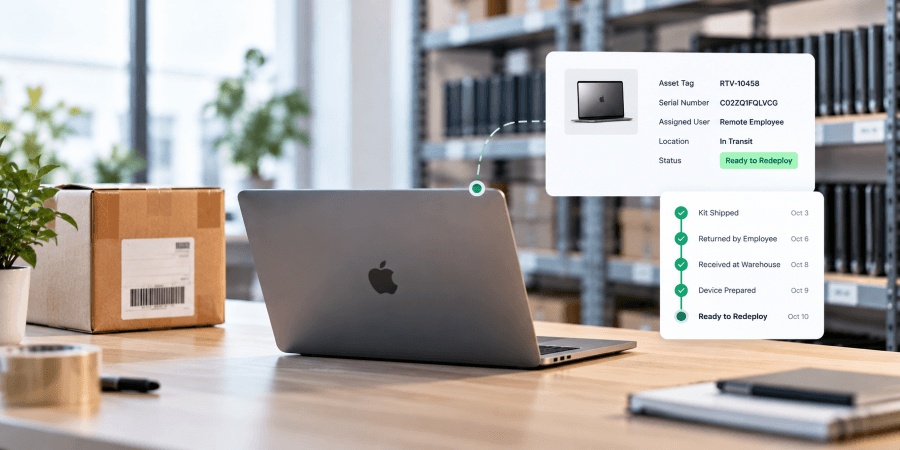
Remote work changed where company hardware lives. Laptops and other devices are no longer sitting in one office where IT can easily see, manage, and recover them. They may be assigned to employees across the country, moving through shipping networks, waiting to be returned, stored in a warehouse, undergoing repair, or ready to be redeployed.
For IT teams, knowing that a laptop was shipped or delivered is not enough. They need visibility that follows the device as it moves between employees, locations, and lifecycle stages.
This guide explains how to track IT assets across a remote workforce, what information IT teams should maintain, and how to create a remote asset management process that provides visibility from deployment through final disposition.
What Is Remote IT Asset Tracking?
Remote IT asset tracking is the process of maintaining accurate information about company-owned devices when employees and hardware are distributed across different locations. It gives IT teams visibility into who has each device, where it is, its current status, and what should happen to it next.
Tracking should continue as a device moves through its lifecycle. A laptop may go from deployment to an employee, through a return shipment, into storage, and eventually back out to another employee. Maintaining an accurate record throughout those transitions helps prevent devices from becoming unaccounted for and gives IT a clearer picture of the hardware the company already owns.
Why Is IT Asset Tracking Harder With Remote Employees?
IT asset tracking becomes more difficult when company hardware is spread across employee homes, offices, shipping networks, and storage locations. IT can no longer rely on physically seeing a device or checking a single equipment room to know where company hardware is located.
Common challenges include:
Asset records becoming outdated when devices change hands or locations
Laptops remaining assigned to employees who have already left the company
Limited visibility into devices that are being shipped or returned
Returned laptops sitting unused because their status was never updated
IT purchasing new equipment without knowing what hardware is already available for redeployment
Device information being spread across spreadsheets, ticketing systems, carrier tracking pages, and other tools
Difficulty identifying which devices are overdue for return
These gaps become more significant as a remote workforce grows. A company managing dozens of laptops may be able to correct records manually, but managing hundreds or thousands of distributed devices requires a consistent process for updating asset information as hardware moves.
Effective remote asset management gives IT visibility beyond the employee currently assigned to a device. It should show when a laptop is deployed, in transit, awaiting return, received, in storage, being repaired, ready for redeployment, or moving toward buyback or disposition.
What Should IT Teams Track for Every Remote Device?
A useful IT asset record should make it easy to identify a device, determine who is responsible for it, and understand where it is in its lifecycle. The exact information will vary by organization, but IT teams should consider tracking:
Serial number or asset ID
Manufacturer and model
Assigned employee
Employee location
Deployment date
Current device status
Shipping and tracking information
Return status
Ticket ID associated with the return
Device condition
Storage location
Repair or preparation status
Redeployment status
Buyback or ITAD status
Final disposition records
How Does Remote IT Asset Tracking Work in Real-World Scenarios?
Remote IT asset tracking becomes most important when hardware is moving between employees, locations, and lifecycle stages. The following scenarios show how maintaining accurate device records and status information can help IT teams manage common hardware workflows across a distributed workforce.
Remote Employee Offboarding
Context: A remote employee leaves the company and needs to return their assigned laptop. IT needs to recover the correct device while maintaining visibility into the return from the time it is initiated until the equipment is received.
Challenge: Without a centralized process, IT may know that a return was requested but not whether the employee has received packaging, shipped the laptop, or whether the device is currently in transit. A carrier tracking number can show where a package is, but it does not necessarily connect that shipment to the specific company asset or internal IT request.
Resolution: IT associates the return with the laptop’s serial number and the corresponding ticket ID, connecting the physical device with the return workflow. Shipment and return statuses can then be tracked as the device moves back to the company.
Context: A company has laptops recovered from former employees in storage while new employees are being onboarded. Some of those devices are still suitable for use and can be redeployed rather than replaced.
Challenge: If IT does not have accurate visibility into stored inventory, it may be difficult to know which laptops are available, their condition, and whether they are ready for another employee. This can result in usable hardware sitting in storage while additional devices are purchased for new hires.
Resolution: IT asset tracking provides visibility into which devices have been returned, their current status, and which laptops are ready for redeployment. When an available device is selected for a new employee, its record can be updated as it moves out of storage, is shipped, and is assigned to its new user. This maintains continuity in the asset record as the same laptop moves between employees.
Hardware Refresh Across a Distributed Workforce
Context: A company begins a scheduled laptop refresh for remote employees across multiple locations. New laptops are being deployed while the devices they replace are being returned at the same time.
Challenge: A hardware refresh creates multiple asset movements that IT needs to track simultaneously. Teams need visibility into which new device was sent to each employee, whether it was delivered, which old laptop is expected back, whether the return has been initiated, and what should happen to the retired device after it is recovered.
Resolution: IT tracks the outgoing deployment and incoming return as separate but connected stages of the hardware lifecycle. Serial numbers and asset records identify the specific devices involved, while shipment and return statuses provide visibility as equipment moves. Once an old laptop is received, its condition and remaining useful life can determine whether it should be redeployed, stored, sold through a buyback program, or moved through IT asset disposition.
Device Return That Stalls
Context: IT initiates a laptop return for a remote employee, but the device does not arrive when expected. The team needs to determine where the return process stopped before deciding what follow-up is necessary.
Challenge: When a return is overdue, IT may not immediately know where the process stalled. Without clear return and shipment statuses, teams can spend time checking carrier pages, spreadsheets, emails, and internal tickets just to determine what happened.
Resolution: Centralized return tracking allows IT to see the current stage of the return and connect it with the device’s serial number and ticket ID. Instead of treating every outstanding laptop the same way, IT can identify where the process stopped and take the appropriate next action.
What Is the Difference Between IT Asset Tracking and Shipment Tracking?
IT asset tracking and shipment tracking provide different types of visibility. For remote IT teams, both are important, but they answer different questions.
Shipment tracking tells IT where a package is during transit. It can show when a shipment was picked up, where it is moving through the carrier network, when it was delivered, or whether a shipping delay occurred.
IT asset tracking follows the device itself throughout its lifecycle. It answers questions such as:
Which device is this?
What is its serial number or asset ID?
Who is it assigned to?
What is its current status?
Is it being deployed, returned, stored, repaired, or redeployed?
Is there a ticket ID associated with the return?
What should happen to the device next?
How Should IT Teams Track Assets Throughout the Device Lifecycle?
IT asset tracking should continue as a device moves from one stage of its lifecycle to another. A laptop should not disappear from visibility simply because it is no longer assigned to an employee.
Procurement
When a device is purchased, IT should create or update the asset record with identifying information such as the manufacturer, model, serial number, and intended destination or user. Establishing the record early gives IT a starting point for tracking the device throughout its useful life.
Deployment
When the laptop is deployed, the asset record should show who the device is assigned to and where it is being sent. Shipment tracking can provide visibility while the device is in transit, and the asset status should be updated once the laptop reaches the employee.
Active Use
While the laptop is assigned, IT should maintain an accurate record of the employee, device, and current status. If the device changes users or locations, the asset record should change with it.
Retrieval
When a laptop needs to come back, IT should be able to connect the return to the specific device. With Retriever, a return can be associated with both the device serial number and a ticket ID.
Warehousing
Once a device is returned, its record should reflect that it is no longer assigned to the previous employee. IT should be able to see that the laptop is in storage, its condition, and whether it is available or being prepared for another use.
Repair and Preparation
Devices that require repair, cleaning, or preparation before reuse should have a status that distinguishes them from hardware that is immediately available. This prevents IT from treating equipment that still needs work as ready inventory.
Redeployment
When a stored laptop is assigned to another employee, the asset record should follow the device through its new deployment and be updated with the new assignment. This maintains the device's history as it moves between users.
Buyback or ITAD
When a laptop is no longer needed or has reached the end of its useful life, its final status should also be documented. Depending on the device, that may include a buyback, secure data destruction, or IT asset disposition. Maintaining final disposition records closes the asset lifecycle rather than leaving retired devices indefinitely listed as active inventory.
How Can IT Track Equipment During Employee Offboarding?
Employee offboarding is one of the points where accurate IT asset tracking matters most. Once an employee leaves, IT needs visibility into the assigned equipment until each company-owned device has been recovered and its status updated.
Step 1: Audit the Departing Employee’s Assigned Assets
Before starting the return, IT should confirm every company-owned device assigned to the departing employee. Cross-reference the employee’s offboarding information with the IT asset record and identify each device by its serial number or asset ID.
Confirming the assigned equipment before initiating the return establishes exactly what IT expects to recover. It also prevents a return from being marked complete when only some of the employee’s assigned equipment has been received.
Step 2: Create the Return Request and Associate a Ticket ID
Once the assigned equipment is confirmed, IT should create the return request and connect it to the employee’s offboarding workflow. Including a ticket ID links the physical device return with the corresponding internal IT or HR process.
The return record should include the information needed to identify both the employee and the equipment being recovered. Keeping the ticket ID associated with the return also makes it easier to follow the device through the laptop return process and maintain an accurate asset record.
Step 3: Ship the Return Kit to the Departing Employee
Once the return request is created, the departing employee should receive everything needed to send the company equipment back. Retriever sends a padded return kit with protective packaging, tape, instructions, and a prepaid, printerless return label.
For Retriever requests received by 4 PM Eastern, the return kit ships the same business day. Providing the packaging and return materials removes the need for the employee to source a box, print a label, or determine how to package the device safely.
Step 4: Monitor Return Kit Delivery
After the return kit ships, IT should track its delivery to confirm that the departing employee received the packaging needed to return the equipment. Kit delivery and device return should be tracked as separate stages because delivery of the kit does not mean the employee has shipped the device.
If the kit cannot be delivered, the shipping information should be reviewed so the issue can be addressed before it delays device recovery during offboarding.
Step 5: Confirm the Employee Ships the Device
After the return kit is delivered, IT should monitor whether the departing employee has actually shipped the equipment back. This creates a clear distinction between a kit that has been delivered and a device that is actively on its way back.
If the employee has not shipped the equipment, automated reminders can follow up on the outstanding return. This allows IT to focus on returns that require additional attention rather than manually checking every offboarding return.
Step 6: Track the Inbound Shipment Through Receipt
Once the employee ships the equipment, IT should track the inbound shipment until the device is received. Carrier tracking shows where the package is in transit, while the return record connects that shipment to the specific employee and device being recovered.
When the package arrives, the return status should be updated to confirm receipt. This closes the shipping portion of the offboarding return process and establishes that the equipment is back under company control.
Step 7: Inspect the Returned Device and Update Its Status
Once the equipment is received, IT should confirm that the physical device matches the asset expected from the departing employee. The serial number or asset ID can be used to connect the returned device with its existing asset record.
The device’s condition and current status should then be recorded. Updating the asset record at receipt gives IT an accurate view of what was recovered and whether the device is ready for storage, repair, redeployment, buyback, or final disposition.
Step 8: Route the Device to Its Next Lifecycle Stage
After the returned device has been identified and its condition recorded, IT should determine what happens next. Depending on the device’s condition, remaining value, and company requirements, it may move to storage, repair, redeployment, buyback, or ITAD.
The asset record should be updated to reflect that next lifecycle stage. Maintaining the same record as the device moves beyond offboarding preserves its history and prevents returned equipment from becoming disconnected from the company’s IT asset tracking process.
How Can Integrations Reduce Manual IT Asset Tracking?
IT asset records can become outdated when teams have to manually enter the same information across multiple systems. Integrations can reduce that work by connecting device workflows with the tools IT and HR teams already use.
For example, an integration can help connect employee or ticketing activity with actions such as deploying a device, initiating a return, or updating an asset workflow. This reduces the need to move information manually between systems and helps keep hardware processes connected to the workflows that triggered them.
Retriever supports integrations with platforms including ServiceNow, Workday, Okta, Jira, Teqtivity, Oomnitza, and Zapier, as well as an API for custom workflows.
For distributed IT teams, integrations can help create a more consistent remote asset management process by reducing duplicate data entry and making it easier to keep device activity connected with existing IT and business systems.
Remote IT Asset Tracking Checklist
A remote asset tracking process should give IT visibility into every device, regardless of whether it is assigned to an employee, in transit, in storage, or moving toward its next lifecycle stage.
Use this checklist to identify gaps in your current process:
Can you identify every device by serial number or asset ID?
Do you know which employee is currently assigned to each device?
Can you see the current location or lifecycle status of each device?
Can you identify devices that are currently in transit?
Can you associate a device return with both its serial number and an internal ticket ID?
Can you quickly identify laptops that are overdue for return?
Do you know which returned devices are in storage, awaiting repair, or ready for redeployment?
Can you see which devices are available for a new employee before purchasing additional hardware?
Are asset records updated when a laptop moves from one employee to another?
Can you track devices through buyback, secure data destruction, or ITAD when they leave active inventory?
Do you maintain documentation of final disposition when a device reaches the end of its lifecycle?
If answering these questions requires checking multiple spreadsheets, carrier websites, emails, and ticketing systems, IT may have shipment information or inventory records without having complete asset visibility.
How Does Retriever Help Track and Manage Remote IT Assets?
Retriever gives IT teams centralized visibility into company devices as they move through retrieval, storage, repair, redeployment, buyback, and disposition. Returns can also be associated with a device serial number and ticket ID, helping connect the physical asset with the corresponding IT workflow.
Once a laptop is recovered, visibility continues beyond the return. IT teams can track stored inventory, device condition, repair or preparation status, and which laptops are ready for redeployment. When a device is sent to another employee, its status can continue through the next deployment.
For devices that will not be redeployed, Retriever supports laptop buybacks, secure data destruction, and IT asset disposition (ITAD). Documentation such as Certificates of Data Destruction can be stored in the Retriever Portal, helping IT maintain records through the final stage of the device lifecycle.
Instead of tracking returns, shipments, stored inventory, and device disposition as separate processes, Retriever gives distributed IT teams a centralized way to manage hardware as it moves throughout its lifecycle.
Frequently Asked Questions About Remote IT Asset Tracking
How can companies track IT assets for remote employees?
Companies can track remote IT assets by maintaining a centralized record for each device that includes its serial number or asset ID, assigned employee, location, current status, and lifecycle stage. Asset records should be updated whenever hardware is deployed, returned, stored, repaired, redeployed, sold, or dispositioned.
What information should be included in an IT asset record?
An IT asset record should include enough information to identify the physical device and understand its current status. This can include the serial number or asset ID, manufacturer and model, assigned employee, location, deployment information, shipment and return status, device condition, storage or repair status, and final disposition. For device returns, a ticket ID can also connect the asset with the corresponding internal workflow.
What is the difference between IT asset tracking and inventory management?
IT asset tracking follows individual devices and their status throughout the hardware lifecycle. Inventory management focuses more broadly on the equipment an organization owns and what is currently available. The two processes overlap, but asset tracking provides device-level visibility into who has a specific laptop, where it is, and what stage of the lifecycle it is in.
How should IT track laptops during employee offboarding?
IT should first confirm which devices are assigned to the departing employee and identify them by serial number or asset ID. The return should then be tracked from initiation through shipment and receipt. Associating the return with a ticket ID can also connect the physical device with the internal offboarding workflow. Once the laptop is received, its condition and next lifecycle stage should be recorded.
How can companies track laptops that are in transit?
Carrier tracking provides visibility into the location and delivery status of a shipment, but that information should also be connected to the corresponding asset record. This allows IT to know not only where the package is, but which device is being shipped, who it is assigned to, and what should happen to it after delivery.
How often should IT asset records be updated?
IT asset records should be updated whenever a meaningful change occurs in the device lifecycle. This includes deployment, reassignment, return initiation, receipt, storage, repair, redeployment, buyback, and final disposition. Updating records as devices move helps prevent asset information from becoming outdated.
How can IT teams track devices in storage?
Stored devices should remain part of the IT asset tracking process. IT teams should maintain visibility into which devices are in inventory, their serial numbers, condition, storage status, whether they require repair or preparation, and whether they are ready for redeployment.
How do integrations improve IT asset tracking?
Integrations can reduce manual data entry by connecting hardware workflows with systems already used by IT and HR. This can make it easier to keep device activity connected with employee, ticketing, and asset-management processes while reducing the need to update the same information manually across multiple systems.
What happens to asset records when a laptop is redeployed?
When a laptop is redeployed, its asset record should be updated to reflect the new employee assignment and deployment information rather than creating a disconnected record. Maintaining the existing asset history allows IT to follow the same physical device as it moves between employees and lifecycle stages.
How can companies prevent remote IT assets from getting lost?
Companies can reduce the risk of remote assets becoming unaccounted for by maintaining accurate device assignments, using unique identifiers such as serial numbers, tracking devices when they move, establishing a consistent return process, following up on overdue equipment, and updating asset records through storage, redeployment, and final disposition.
What information should IT verify before starting a laptop return?
Before starting a laptop return, IT should confirm which devices are assigned to the departing employee and identify each device by its serial number or asset ID. IT should also verify the employee information needed for the return and connect the return to the appropriate offboarding workflow or ticket ID.
How can IT track whether a departing employee has shipped their laptop?
IT can track whether a departing employee has shipped their laptop by monitoring the return status separately from the delivery of the return kit. Once the employee ships the device, carrier tracking can show that the equipment is in transit and connect the shipment with the corresponding asset record.
This distinction prevents IT from treating delivery of the return kit as completion of the laptop return process.
What should IT do after a returned laptop is received?
After a returned laptop is received, IT should verify that the device matches the expected serial number or asset ID and record its condition. The asset record should then be updated to show that the device has been recovered and identify its next lifecycle stage, such as storage, repair, redeployment, buyback, or ITAD.
How Can Businesses Improve Remote IT Asset Tracking?
Effective remote IT asset tracking depends on maintaining an accurate record as hardware moves between employees, locations, and lifecycle stages. IT teams should be able to identify each device, see who it is assigned to, track its current status, and know what needs to happen next.
Retriever helps IT teams manage remote hardware through warehousing, repairs, redeployment, buybacks, secure data destruction, and ITAD, with centralized visibility into device activity and status.
Ready to simplify remote IT asset management? Book a demo to see how Retriever works.