
How to Automate Employee Equipment Returns With HR and IT Integrations
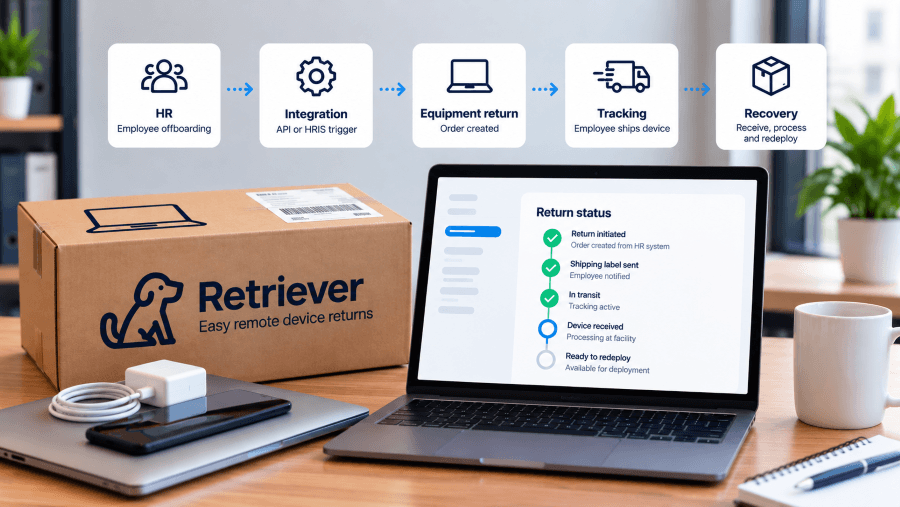
Employee offboarding may start in HR, but equipment recovery often becomes a separate manual process for IT. Someone has to identify the employee’s device, initiate the return, enter shipping information, monitor its status, follow up when the laptop is not returned, and update internal systems when the process is complete.
That creates unnecessary work, especially for companies managing remote employees or frequent offboarding. Even when HR, IT, and asset management systems already contain the information needed to start a return, IT teams may still be manually transferring that information from one system to another.
Equipment return automation connects those workflows. An offboarding event in an HR or IT system can be used to initiate a device return through an integration or API, passing the information needed to start the recovery process without requiring IT to create every return manually.
For companies managing distributed workforces, that can turn equipment recovery from a series of manual handoffs into a repeatable workflow that is easier to track and scale.
Can Employee Equipment Returns Be Automated?
Yes. Employee equipment returns can be automated by connecting HR, IT, or asset management systems with a device return platform through integrations, workflow automation, or an API.
For example, when an employee is marked for offboarding, a connected workflow can use employee and device information already stored in company systems to create a return request. From there, the equipment return process can begin without an IT team member manually entering the same information into another system.
Retriever's API supports the creation of device return orders using information such as the employee's name and address, device type, serial number, ticket ID, and company return information. A return can also be designated for Retriever warehousing or data destruction when the order is created.
How Does an Automated Equipment Return Process Work?
An automated equipment return process connects an employee offboarding event with the systems used to initiate, manage, and track the return of company-owned devices.
A typical automated workflow can look like this:
An employee is marked for offboarding. The process begins in the company’s HR, IT, or other system used to manage employee departures.
Employee and device information is passed to the return workflow. Instead of IT re-entering information manually, an integration can send details such as the employee’s name and address, device type, serial number, and internal ticket ID to the device return platform.
The device return order is created. Retriever’s API can create a return order and specify whether the device should be returned to the company, sent to Retriever for warehousing, or routed for data destruction.
The return process begins. Retriever manages the operational return process, including the return kit, prepaid shipping, employee communication, reminders, tracking, and escalation.
IT tracks the return. Return orders can be retrieved through the API, including individual order details, so return information can remain visible within connected IT workflows.
The returned device moves to its next lifecycle stage. Depending on the return request and company requirements, the device can be sent to storage, prepared for reuse, or moved into a secure data destruction workflow.
For companies that warehouse laptops with Retriever, automation can continue beyond the return. Retriever’s Deployment Orders API allows a stored laptop to be selected and deployed to another employee, with options for shipping speed and an included return label.
How Does Equipment Return Automation Work in Real-World Scenarios?
Scenario: High-Frequency Offboarding at a Distributed SaaS Company
The Challenge: A distributed SaaS company processes 20 employee departures in a month. Each departing employee has a company laptop that needs to be recovered. Without automation, IT has to create each return individually, enter employee and device information, send return instructions, monitor shipments, and follow up when equipment is not returned. At that volume, the remote employee offboarding workflow can quickly become a repetitive administrative task for a lean IT team.
The Automation Approach: The company connects its existing HR or IT workflow with Retriever so a departure can trigger the laptop retrieval automation process. Employee and return information is passed into the return request, and Retriever manages the return kit, employee communications, automated reminders, and shipment tracking. IT can monitor return statuses rather than manually initiating and following up on every return.
The Outcome: In this scenario, automating the workflow removes 20 manual return-request setups from IT's monthly workload. If each return previously required five routine manual actions, such as creating the request, sending instructions, checking shipment status, sending a reminder, and updating the internal ticket, automation reduces up to 100 individual administrative actions across those 20 offboardings. IT can then focus manual attention on exceptions rather than performing the same steps for every return.
Scenario: International Equipment Returns Across Multiple Countries
The Challenge: A distributed company needs to recover 12 laptops from departing employees across the United States, Canada, the United Kingdom, Germany, and Spain. Without a standardized process, IT has to coordinate 12 individual returns while dealing with different shipping requirements, employee communications, tracking information, and international customs requirements. Managing IT asset recovery for distributed teams becomes more complicated when equipment is spread across multiple countries.
The Automation Approach: The company creates the 12 return requests through Retriever rather than coordinating each shipment independently. Retriever manages the return logistics, including employee instructions, packaging and shipping, tracking, and international customs requirements. Retriever provides international quotes on a Delivered Duty Paid (DDP) basis, with applicable shipping, duties, and taxes included. IT can monitor the individual returns through a centralized workflow instead of managing separate processes for each country.
The Outcome: In this scenario, one standardized equipment return process replaces five country-specific workflows for the 12 departing employees. Instead of IT independently coordinating packaging, shipping, tracking, employee communication, and customs requirements across five countries, those 12 returns move through the same managed workflow. The measurable change is a reduction from five separate country-level return processes to one standardized process, while IT maintains visibility into all 12 equipment returns from initiation through recovery.
Scenario: Device Reuse and Redeployment After Employee Offboarding
The Challenge: A remote company offboards 15 employees during a quarter and recovers 15 company laptops. Ten of the returned devices are still in good condition and suitable for reuse. Without a connected device lifecycle management process, IT may treat retrieval and deployment as separate workflows. Returned laptops can sit in storage while the company purchases new equipment for incoming employees.
The Automation Approach: The company uses Retriever to manage the laptops beyond the initial return. After the devices are recovered, their condition and status are recorded and the 10 reusable laptops are prepared for redeployment. When 10 new employees need equipment, IT can select those available devices from inventory and initiate redeployment rather than purchasing 10 additional laptops.
The Outcome: In this scenario, the company redeploys 10 of the 15 recovered laptops, resulting in a 67% reuse rate for the returned devices and avoiding the purchase of 10 replacement laptops. IT can measure the number and percentage of recovered devices returned to active use, the number of new-device purchases avoided, and the time each laptop spends in storage before redeployment. This connects equipment recovery with reuse instead of allowing returned hardware to become idle inventory.
Scenario: Equipment Returns in a Compliance-Sensitive Organization
The Challenge: A financial services company offboards 25 remote employees during a quarter. Each employee has a company laptop that may contain sensitive business or customer information. Recovering the hardware is only part of the process. IT also needs to maintain visibility into each device, securely sanitize company data, and retain documentation showing how returned equipment was handled. Without a consistent process, offboarding equipment compliance can become difficult to document across a distributed workforce.
The Automation Approach: The company uses Retriever to manage all 25 device returns through a standardized workflow. Each return can be associated with the laptop’s serial number and an internal ticket ID, helping connect the physical asset with the offboarding request. Return status is tracked through recovery, and returned devices that require data destruction can be processed using an appropriate sanitization method. Certificates of Data Destruction provide documentation of completed data destruction.
The Outcome: In this scenario, 25 offboardings produce 25 traceable device-return records, with each laptop connected to its serial number and corresponding return workflow. If all 25 devices require data destruction, the organization can also maintain 25 corresponding Certificates of Data Destruction rather than relying on undocumented confirmation that the laptops were wiped. This gives IT a measurable documentation target: every recovered device requiring sanitization has a corresponding data-destruction record.
What Integrations Can Automate Employee Equipment Returns?
Equipment returns can be automated through HR, IT service management, identity management, asset management, and workflow automation systems that connect employee or device events with the return process.
The right integration depends on where a company manages employee departures and device information. The goal is not to replace those systems, but to connect them so IT does not have to manually recreate a return request every time an employee leaves.
HRIS Integrations
HR systems can serve as the starting point for an automated equipment return. When an employee is marked for offboarding, a workflow can pass the required employee and device information to the return process.
This helps reduce the delay between an employee departure being recorded by HR and IT beginning equipment recovery.
IT Service Management Integrations
ITSM platforms can connect equipment returns with existing service tickets and offboarding workflows. Retriever's API accepts a ticket ID when a return order is created, allowing the return to be associated with an internal ticket or workflow.
Return-order information can also be retrieved through the API, giving companies a way to incorporate return status into their existing IT processes.
IT Asset Management Integrations
Asset management systems can provide device information needed for recovery, such as the device assigned to an employee and its serial number. That information can be passed to Retriever when the return order is created rather than entered manually by IT.
For devices stored with Retriever, the API can also provide warehouse inventory and individual device details, including serial number, manufacturer, model, operating system, status, and current location.
APIs and Workflow Automation
An API gives companies flexibility to build equipment returns into their existing workflows. Retriever's API supports creating and retrieving device return orders, creating and retrieving deployment orders, and accessing warehouse device information.
The specific automation available will depend on the capabilities of the connected HR, IT, or asset management system and how the integration is configured.
How Does Automation Make Remote Equipment Retrieval More Efficient?
Automation makes remote equipment retrieval more efficient by reducing the manual work and delays between employee offboarding, return initiation, follow-up, tracking, and device recovery.
With a manual process, routine return tasks can create bottlenecks as offboarding volume increases, making it harder for IT to identify the returns that actually need attention.
An automated workflow can initiate the return earlier by using employee and device information already available in HR, IT, or asset management systems. Instead of re-entering that information into a separate return process, IT can use connected workflows to begin recovery sooner.
Once the return is underway, IT can retrieve return orders and individual order details through the API rather than relying on separate manual records to determine the status of a return.
Automation does not eliminate every exception. An employee may still delay a return, an address may be incorrect, or a device may require additional handling. Instead, automation reduces the routine administrative work so IT teams can spend more time managing the returns that actually require intervention.
This is particularly useful for distributed companies, where equipment recovery may involve employees in different locations and IT teams cannot rely on an employee simply returning a laptop to an office.
What Are the Best Practices for Automating IT Asset Recovery?
Best practices for automating IT asset recovery include starting the return process early, maintaining accurate employee and device data, automating routine communication, keeping return status visible, and establishing clear escalation rules.
Automation works best when the systems involved contain reliable information and each stage has a defined owner. Employee contact details and device assignments should be current, while return workflows should clearly define what happens when equipment is not shipped or another exception occurs.
How Do You Automate an Equipment Return Workflow?
Companies can automate equipment returns by connecting the system that manages employee offboarding with the return process, passing accurate employee and device data, and establishing how returns will be tracked and handled when exceptions occur.
1. Identify What Should Trigger the Return
Decide which event should start equipment recovery. Depending on the company, that might be an employee being marked for offboarding in an HR system, an IT service ticket being created, or another event within an existing workflow.
2. Determine What Information the Return Process Needs
Identify which employee and device information needs to move between systems to create the return. Map where that information is stored and confirm that the required data is accurate before automating the workflow.
3. Connect the Offboarding Workflow to the Return Process
Use an existing integration, workflow automation tool, or API to pass the required information from the company's HR, IT, or asset management system into the equipment return workflow.
With Retriever's API, a connected system can create a device return order and specify whether the returned equipment should be sent back to the company, routed to Retriever's warehouse, or sent for data destruction.
4. Decide How Return Status Will Be Tracked
Determine where IT should monitor equipment recovery. Companies can use the Retriever Portal, or return-order information can be retrieved through the API for use within connected IT workflows.
The goal is to give IT a clear view of returns without creating another manual tracking process.
5. Plan What Happens After the Device Is Returned
Automation should account for the device's next step, not just getting it back. Depending on the company's requirements, returned equipment may need to be inspected, stored, prepared for reuse, or securely retired.
For devices stored with Retriever, returned laptops can later be redeployed to another employee rather than treating recovery as the end of the device lifecycle.
How Does Retriever Automate Employee Equipment Returns?
Retriever automates employee equipment returns by connecting device recovery with the HR, IT, and asset management workflows companies already use, reducing the manual work required to initiate and manage each return.
Companies can initiate returns through the Retriever Portal or use Retriever's API to create device return orders from connected systems, reducing duplicate data entry during offboarding.
Once a return is initiated, Retriever manages the operational work involved in getting the equipment back, including sending the return kit, providing prepaid shipping, communicating with the employee, sending reminders, tracking the shipment, and escalating returns that need additional follow-up.
IT teams can monitor device activity through the Retriever Portal. Return-order information can also be retrieved through the API, allowing companies to incorporate return information into their existing IT workflows.
Automation can continue after a device is recovered. A return order can route equipment to Retriever's warehouse or for data destruction. Companies using Retriever's warehousing service can access stored device information through the API and create deployment orders when a laptop is ready to be sent to another employee.
Frequently Asked Questions
Can employee equipment returns be automated?
Yes. Employee equipment returns can be automated by connecting HR, IT, or asset management workflows with equipment return software through integrations, workflow automation, or an API. This allows employee and device information to move into the return process without IT manually creating every return.
Can an HRIS automatically trigger a laptop return?
Yes. An HRIS event can be used to trigger a laptop return when the HR system is connected to the return workflow through an integration, automation platform, or API. The specific setup depends on the HRIS and how the integration is configured.
What systems can integrate with equipment return software?
Equipment return software can connect with HRIS, IT service management, identity management, IT asset management, and other workflow systems. APIs can also be used to build custom connections between equipment returns and the systems a company already uses.
Can equipment returns integrate with ServiceNow?
Yes. Equipment return workflows can be connected with ServiceNow so device recovery can become part of an existing IT service management or offboarding process. Retriever supports ServiceNow integration as well as API-based workflows.
What information is needed to automate a laptop return?
Automating a laptop return typically requires employee contact and shipping information along with information identifying the device being recovered. Retriever's API can accept details including the employee's name and address, device type, serial number, ticket ID, and company return information.
Do companies need developers to automate equipment returns?
Not always. The technical resources required depend on the type of integration. Existing integrations and workflow automation tools may require less development work, while companies building custom workflows directly with an API may need technical resources to configure and maintain the connection.
Can equipment return automation continue after a laptop is recovered?
Yes. Equipment automation can extend beyond recovery when returned devices are being stored and reused. Retriever's API supports warehouse device visibility and deployment orders, allowing companies using Retriever's warehousing service to access stored-device information and initiate deployment of a laptop to another employee.
How long does an automated laptop return take?
The total time depends on the employee’s location, shipping transit times, and how quickly the employee sends the equipment back. With Retriever, a return kit typically ships within one business day, takes approximately two to three days to reach the employee, and another two to three days to return after the employee ships the device. Employee response time can affect the overall timeline.
What happens if an employee does not return their laptop?
If an employee has not returned their laptop, automated reminders can continue following up without requiring IT to send each message manually. IT can also monitor the return status to determine whether the return kit was delivered, whether the employee has shipped the device, and where the equipment is in the recovery process.
Can international employee equipment returns be automated?
Yes. Companies can use an automated equipment return process for employees located in multiple countries. Retriever supports international device returns and manages logistics such as shipping, customs documentation, duties, and taxes. This allows distributed IT teams to manage international returns through a standardized process rather than coordinating each return independently.
How does equipment return automation support security and compliance requirements?
Equipment return automation can help organizations maintain a consistent process for recovering company-owned devices and documenting what happens after they are received. Returned devices can move through secure data destruction when required, with Certificates of Data Destruction providing documentation that sanitization was completed. Organizations should determine which security, regulatory, and compliance requirements apply to their specific environment.
Can a laptop return be triggered before an employee's last day?
Yes. A return can be initiated before an employee’s final day when the organization’s offboarding workflow provides the necessary employee and return information in advance. Starting the process earlier can allow packaging and return instructions to reach the employee before the equipment is due back.
What happens if an employee's shipping address is incorrect?
Accurate employee shipping information is important because it is used to send return materials and coordinate the device recovery. Companies should verify employee contact and address information before initiating the return. If incorrect information is identified, it should be corrected as early as possible to avoid delays in the return process.
Can IT track multiple employee equipment returns at the same time?
Yes. IT teams can monitor multiple active returns through a centralized system rather than tracking each return independently through emails, spreadsheets, and carrier websites. Return statuses can show where individual devices are in the recovery process, helping IT identify completed returns as well as equipment that may require additional follow-up.
What is the difference between manual and automated equipment returns?
A manual equipment return requires IT to perform steps such as creating the return, entering employee information, sending instructions, checking shipment status, and following up with employees. An automated equipment return connects those activities to an existing HR, IT, or asset management workflow so routine steps can occur without IT manually managing each return. IT can then focus on exceptions and returns that require direct attention.
How Can Companies Get Started With Automated Equipment Returns?
Companies can get started with automated equipment returns by identifying where employee offboarding begins today and which manual steps can be connected to the device return process.
Start by looking at how HR notifies IT of a departure, where employee and device information is stored, how return requests are currently created, and how IT tracks equipment until it is recovered. From there, determine whether an existing integration, workflow automation tool, or API can connect those steps.
The goal does not have to be automating everything at once. Even automating return initiation can eliminate duplicate data entry and help equipment recovery begin sooner.
Retriever helps companies manage employee equipment returns from initiation through recovery, with integrations and API capabilities that can connect device returns to existing HR and IT workflows.
Ready to automate your equipment return process? Learn more about Retriever or schedule a demo to see how it can work with your existing systems.